Last updated August 6, 2026. Install commands and config fields verified against the TencentDB-Agent-Memory repository, the npm plugin documentation, and Tencent Cloud Memory onboarding docs.
If you have built an AI Agent on OpenClaw, Hermes, or a custom framework, you have probably hit this wall: by round three it forgot your Swift style guide; after twenty tool calls the context blew up and it started inventing file paths; start a new session and you are explaining the project from scratch again.
The usual fixes—dump everything into a vector database or run aggressive summarization—trade one problem for another. Tencent's open-source TencentDB Agent Memory (MIT, 2026) takes a different route: symbolic short-term memory plus four-layer long-term storage (L0–L3), with a default backend of local SQLite + sqlite-vec and no cloud dependency to get started. This guide is written for iOS, Flutter, and AI developers who want to understand the model first, install the plugin second, and only then decide whether memory should live on a laptop or a cloud Mac that stays online 24/7.
Introduction: why Agents keep "forgetting"
Long-running Agent failures are rarely about model IQ. They are about context management. A single Wide Search or SWE-bench-style task can return hundreds of thousands of tokens—JSON payloads, page bodies, compiler logs. Keep every byte in the window and cost plus latency explode; delete blindly and the Agent repeats searches or edits the wrong file on the next turn.
TencentDB Agent Memory targets that tension directly: remember what matters while keeping a full evidence trail you can drill into. Public benchmarks on OpenClaw plugin workloads report up to ~61% token savings on short-term memory tasks and PersonaMem long-term accuracy rising from 48% to 76%. Your mileage will vary by model and task, but the direction is clear—layering plus offload beats flattening history into one vector pile.
For Kvmkit readers, this stack shows up in two common shapes: (1) attach the OpenClaw memory plugin on a Mac while coding in Cursor or Claude Code; (2) write Flutter on Windows, run Gateway plus local MLX inference on a cloud Mac mini, and keep memory services on the same stable node as Xcode builds.
Core concepts: layered memory and symbolic short-term compression
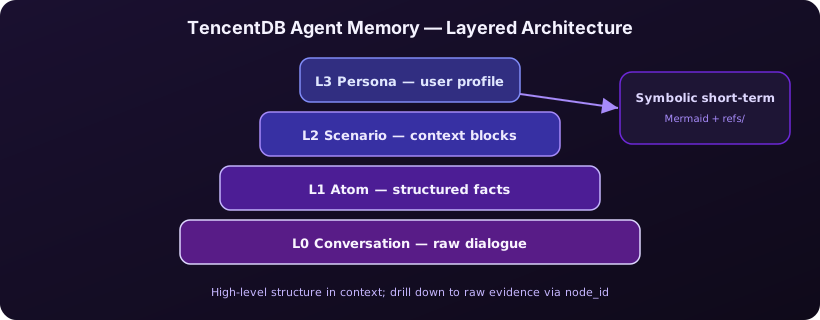
The project explicitly rejects "slice every turn into embeddings and hope retrieval works." Long-term memory is a semantic pyramid; short-term memory is a Mermaid task canvas. Both support progressive disclosure: only high-level structure enters the model context, with indexed paths to raw evidence when verification is needed.
Long-term layers (L0 → L3)
- L0 Conversation — raw dialogue and tool traces, the immutable evidence base;
- L1 Atom — structured facts extracted from chat (dates, preferences, stack choices);
- L2 Scenario — clusters of Atoms into scenario blocks (e.g. "iOS CI code-signing flow");
- L3 Persona — cross-scenario user profile written to a readable
persona.mdfor recall before the next session.
Recall defaults to Persona and Scenario first, then retrieves Atoms or L0 source text on demand—similar to remembering "this teammate prefers SwiftUI" before scrolling chat logs for proof.
Short-term memory: Mermaid offload
Tool logs land in refs/*.md while the context keeps a lightweight Mermaid graph with node_id markers. The Agent reasons over symbols; if a node looks suspicious, grep by node_id to pull the full original log—100% traceability without stuffing megabytes of stdout back into the window.
If you are wiring MCP tools in parallel, install memory alongside a guide like How to Deploy GitHub MCP Server: A Cross-Platform Guide for Windows, Linux, and macOS—tools answer "what can I do?"; memory answers "what did we already do, and who is this user?"
Hands-on: OpenClaw plugin and Gateway deployment
The fastest path is the OpenClaw plugin (requires Node.js ≥ 22.16). Commands below run in macOS or Linux terminals; on Windows, use WSL2 or host the Gateway on a cloud Mac.
Option A: OpenClaw zero-config (recommended to start)
# Install the plugin
openclaw plugins install @tencentdb-agent-memory/memory-tencentdb
openclaw gateway restart
Enable in ~/.openclaw/openclaw.json:
{
  "memory-tencentdb": {
    "enabled": true
  }
}
The default backend is local SQLite. The plugin handles conversation recording, memory extraction, scenario clustering, persona generation, and next-turn recall. Upgrade with openclaw plugins update @tencentdb-agent-memory/memory-tencentdb—avoid loose semver ranges that can silently disable the plugin.
Enable short-term compression (plugin ≥ 0.3.4)
Turn on offload and register the contextEngine slot:
{
  "memory-tencentdb": {
    "config": {
      "offload": { "enabled": true }
    }
  },
  "plugins": {
    "slots": {
      "contextEngine": "memory-tencentdb"
    }
  }
}
Run scripts/openclaw-after-tool-call-messages.patch.sh from the repo (re-run after OpenClaw upgrades). Without this patch, tool results may not offload correctly— a common root cause of "plugin installed but tokens did not drop."
Option B: Hermes Docker all-in-one
For Hermes Agent, build and run a memory-enabled container (Gateway on port 8420):
cd TencentDB-Agent-Memory/docker/opensource
docker build -f Dockerfile.hermes -t hermes-memory .
docker run -d --name hermes-memory -p 8420:8420 \
  -e MODEL_API_KEY="your-api-key" \
  -v hermes_data:/opt/data hermes-memory
curl http://localhost:8420/health
A response of {"status":"ok"} or degraded is enough to proceed. The image ships with a default DeepSeek-V3.2 endpoint—pass only an API key if you use that model.
Option C: Custom Agent + Python SDK (cloud path)
When the team needs Tencent Cloud managed memory, create a Memory instance in the console and install the SDK:
pip install tencentdb-agent-memory-sdkUse the async client to write sessions and retrieve atomic memories (fields per console docs). This suits Python orchestration with multiple Agents sharing one team memory store—personal trials do not need the cloud.
Acceptance checklist
- After three conversation rounds, confirm
persona.mdor scenario files exist; - With offload enabled, compare token curves on the same SWE-style task before and after;
- Force the Agent to cite an old tool result—verify recovery via
node_idintorefs/; - If Tool Calls loop endlessly, follow Kimi K3 Tool Calls Loop: 2026 Stop-Loss Guide on message-chain integrity before blaming the memory plugin.
Pairing with cloud Mac and Apple Silicon
A Memory Gateway is a always-on service: it listens on a port, reads and writes SQLite, and runs extraction and recall in the background. Laptop sleep, Windows Update reboots, and flaky home networks all look like sudden amnesia to your Agent. A more realistic iOS-team layout:
- Local — Cursor or Xcode for day-to-day coding;
- Cloud Mac mini — OpenClaw Gateway + TencentDB Memory + Ollama or MLX on one machine;
- Remote — SSH or screen sharing for debug; persistent data volume on cloud disk.
Apple Silicon brings unified memory and a native Unix stack: Node 22, Docker Desktop, and Homebrew paths are predictable; a Gateway can idle at a few watts on M4 Mac mini—far less than a desktop GPU. If you are already exploring running small models on a local GPU, keep heavy inference on Windows and move memory plus macOS toolchain jobs that must stay online to a Kvmkit cloud Mac so closing your lid does not kill the session.
Cost, performance, and risk comparison
| Approach | Rough monthly cost | Best for | Main risk |
|---|---|---|---|
| Local SQLite plugin | $0 (LLM API only) | Solo OpenClaw experiments | Machine sleep breaks continuity; you own backups |
| Self-hosted Docker Gateway | Power + API | Small-team Hermes on LAN | Image upgrades and disk growth |
| Tencent Cloud managed Memory | Instance pricing | Multi-Agent team sharing | Compliance and data residency rules |
| Kvmkit cloud Mac | Hourly or monthly | Gateway + Xcode + MLX on one host | Network and secrets hygiene |
A simple decision rule: prototype on local SQLite at zero infra cost; once memory becomes a team asset, migrate to an always-on cloud Mac or Tencent instance. Do not run production Agents on a laptop for two weeks and migrate later—L0 dialogue and refs/ exports are easy to underestimate.
FAQ
Does TencentDB Agent Memory require Tencent Cloud?
No. The OpenClaw plugin defaults to local SQLite with no external Memory API. Use the console instance plus Python SDK only when you need managed hosting, vector scaling, or compliance-driven cloud storage.
How is this different from LangChain or Mem0 vector memory?
This project emphasizes L0–L3 layering and Mermaid short-term offload—not flattening all history into one vector index. Recall path is Persona → Scenario → Atom → raw text, auditable and drillable.
After installing the OpenClaw plugin, do I need a separate Gateway?
On OpenClaw, gateway restart loads the plugin. Hermes or custom Python Agents need a healthy Gateway on port 8420—Docker or npx tsx as documented.
What are the Mac version requirements?
npm plugin needs Node.js ≥ 22.16; short-term compression needs plugin ≥ 0.3.4. Apple Silicon runs natively and pairs well with MLX or Ollama on the same host.
Summary
- TencentDB Agent Memory uses L0–L3 layering plus Mermaid offload to tame long Agent contexts; local SQLite is enough to start.
- OpenClaw plugin is the fastest on-ramp; Hermes uses Docker; enterprise custom stacks use the Python SDK on Tencent Cloud.
- When memory and macOS tooling must run 24/7, a cloud Mac mini beats a sleeping laptop.
Agent memory is not solved by "add a few more vectors." Run the layered model first, then decide whether data stays on local SQLite or moves to a team node—get that right and wiring iOS CI, MCP tools, or larger models downstream gets much easier.
Run your Agent memory node on a cloud Mac
TencentDB Agent Memory's Gateway needs an environment that is always online, low-interruption, and Unix-native. Apple Silicon Mac mini is quiet and low-power; M4 unified memory can host memory extraction and local inference side by side. Kvmkit cloud Mac lets you skip buying hardware while keeping OpenClaw, Memory, and Xcode on one remote workspace—connect from a Windows daily driver over remote desktop.
View Kvmkit cloud Mac plans and give your team Agent a node that does not "forget" when someone closes a laptop lid.