
Last updated 18 August 2026. Technical claims in this article were checked against Google’s Managed Agents (Gemini Agent), Function calling, and Using Tools with Gemini API docs.
Symptom: Your docs mix Gemini, Agent, Tools, and Function calling, so the team cannot tell whether to ship Interactions, a homegrown loop, or a managed agent.
Fastest fix: Separate “the model proposed a call” from “who executes side effects.” Built-in tools run in Google’s sandbox. Custom functions stay in your app until you return a function_result.
This guide is for backend engineers wiring Google AI Agent to orders and internal APIs, architects comparing a custom Agent Loop with Managed Agents, and platform teams that can chat but cannot safely write to a database.
What “Gemini Agent” actually refers to
In product meetings the same phrase covers three layers. Mixing them reverses procurement, IAM, and incident response.
Layer one is the Gemini model. Given a function schema, it can emit a structured function_call instead of prose. That answers “does the model know what to invoke?” It does not receive your database password and it does not fire your real HTTP calls.
Layer two is Gemini API tools. Official docs treat tools as capabilities the model may request in a turn or a Live session: hosted Google Search, Code Execution, and URL Context, or your own Function Calling declarations. See the Tools documentation.
Layer three is a productized Gemini Agent / Managed Agent. You freeze system instructions, default tools, remote MCP, custom functions, files, and AGENTS.md / SKILL.md into an agent you invoke by ID through the Interactions API. Defaults include code_execution, google_search, and url_context; a single interaction can override that list. See Building Managed Agents.
If you only need one structured lookup, Function calling is enough. If you need a sandbox, search, code execution, remote MCP, and a reusable agent config, graduate to Managed Agents. Do not pour every business rule into the system prompt just because the label says Agent.
How tools, APIs, and functions split responsibility
The three nouns in the title are three execution paths.
- Tools are the catalog the model sees. Hosted tools run at Google. Custom tools are declarations; your process still executes them.
- APIs are your business HTTP, third-party endpoints, and queries. The model never holds the secret; your service authenticates for real.
- Functions are local code, SDK methods, and queue producers. Declare them with JSON Schema and correlate results with
name,arguments, and a uniqueid.
Google lists three Function calling jobs: take actions, augment knowledge, and extend capabilities. That is not the same as Structured Outputs, which only constrain the final user-visible payload. Use Function calling when an intermediate hop must hit a system you own. Details live in the Function calling guide.
If you already operate another vendor’s tool loop, keep the same orchestration discipline. For memory layout after tools return, see Redis vs Postgres vs TencentDB: Which Memory Database Fits AI Agents? (2026). For isolating agent file writes from the host, see What Is an AI Virtual File System? The Complete 2026 Guide.
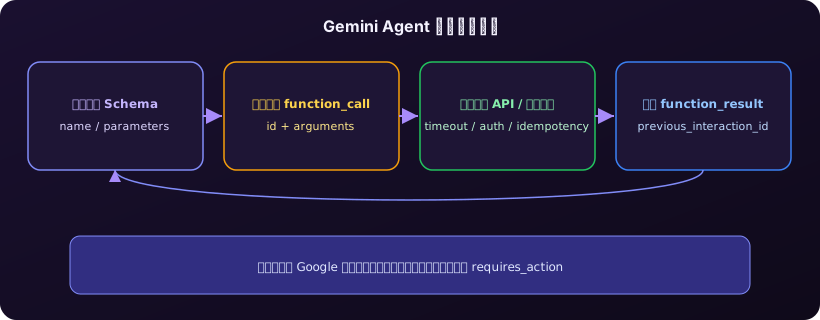
The full function-calling loop
A call is not “successful” when the model prints a function name. Google’s flow compresses to five steps; skip one and you get duplicate orders or invented arguments.
- Declare
name,description, and JSON Schema. Spell out when not to call the tool. - Request by sending the user turn plus tools to
interactions.createorgenerateContent. - Decide: the model answers in text or returns
function_callwithidandarguments. - Execute locally: validate types, auth, timeouts, and idempotency keys, then hit the real API. The model does not run your custom code.
- Return a
function_resultwith the sameid, usingprevious_interaction_idwhen you continue the thread.
A minimal declaration looks like this. In production, put business identifiers in required and ban invented enums:
{
  "type": "function",
  "name": "get_order_status",
  "description": "Look up fulfillment status by order id. Never create or cancel orders.",
  "parameters": {
    "type": "object",
    "properties": {
      "order_id": {"type": "string", "description": "Business order id such as OD-20260818-001"}
    },
    "required": ["order_id"]
  }
}
Do not concatenate model arguments into SQL or a shell. Validate against the schema, map to an internal DTO, then call the API with a service account. Return only fields the next reasoning step needs. Parallel calls in one turn can fetch stock and shipping together; compositional calls must wait, for example weather then thermostat. Aggregate streamed arguments before you execute—never hit production with a half-built order_id.
Built-in tools vs custom functions
The usual production bug is treating “the model requested a tool” as “the server already did the work.” Official Tools docs split the paths:
- Built-in tools (search, code execution, URL context) run under Google. Sandbox steps emit matching
function_resultrecords. - Custom functions stay in your process. You receive structured JSON plus a unique
id.
Managed Agents make the contract explicit. Mixed sandbox and custom tools use step matching. Built-in work finishes server-side. Pending custom calls put the interaction in requires_action. Your client must skip call_id values that already have a function_result. Executing the same id twice is an incident in payments, not a retry.
Keep four artifacts: the original function_call, local execution logs, the returned function_result, and the interaction status (complete, requires_action, failed). A chat UI badge that says “tool used” is not an audit trail.
Modes, MCP, and compositional calls
When the model must call a tool is a config problem, not a prompt lottery. Interactions documents tool_choice as auto, any, none, and preview validated. Forcing any on a weather lookup is fine. Forcing any on “delete production data” without human approval is not.
Remote MCP attaches an external tool server via name and url. Convenient for IDEs and internal catalogs—dangerous if the server is unauthenticated on the public internet. Gemini 3 can mix built-in tools and custom functions in one interaction; previous_interaction_id carries built-in context forward. Archive logs by interaction, not by a single HTTP POST, or the second hop looks like a spontaneous extra call.
Controls you need before production writes
A demo that returns weather is not an unattended worker. Gate these six items before you enable writes:
- Split read and write into different functions; omit capabilities the model must never see.
- Idempotency keys on create, charge, and email, keyed by
function_call.idor your request id. - Deadlines that return a typed error object so the model does not retry with mutated args.
- Minimal results—status, summary, next hint—not full row dumps.
- Budgets for tool hops, wall time, and tokens; overflow to a human queue.
- Replay: schema version, model version, arguments, result hash.
If a tool result may already have landed in a business system, query the idempotency table. Do not “let the model try again.” If the UI rendered one call twice, fix log aggregation, not the prompt.
Remember three lines: Structured Outputs for the final payload; Function calling to reach your APIs; Managed Agents when you need sandbox, search, MCP, and a reusable config. All three can live in one product, but execution ownership must sit on the architecture diagram.
Running the Gemini Agent loop on a laptop that sleeps drops requires_action callbacks and truncates interaction logs. A throwaway VM starts a process but rarely keeps a stable macOS toolchain. For overnight replay of function calls, renting a Kvmkit Mac is usually cleaner than hijacking a personal notebook. Start from Mac support and the US East Mac mini rental options. Keep USB-bound or private-network workloads on hardware you own.
A cloud Mac mini is where the tool loop actually finishes
Gemini Agent earns its keep when custom functions run to completion and logs can be replayed. Apple Silicon Mac mini puts a Unix toolchain, Docker, and low idle power on one box. M4 unified memory can host a model client and interaction archives together; about 4W idle supports 24/7 regression, and Gatekeeper plus SIP beat scattering production keys across shared Windows build agents.
If Function calling has to leave the demo and become an auditable unattended job, Kvmkit cloud Mac mini M4 is the practical starting point—see current plans so evidence does not vanish when a laptop lid closes.