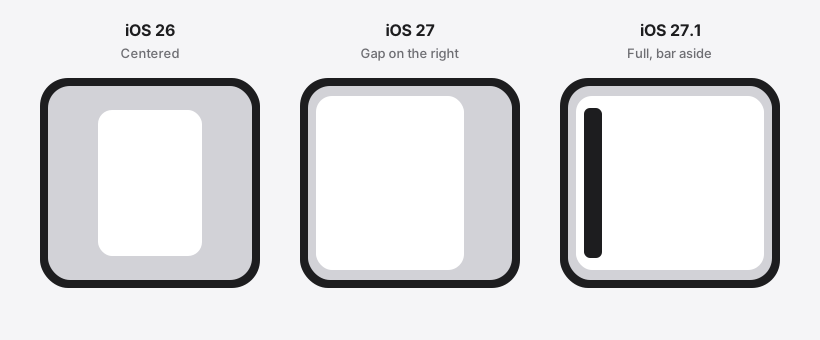
Open a new iPhone Duo and the apps you already use will almost certainly launch. An app does not crash just because nobody redesigned it for a foldable. If the binary was built with the iOS 26 SDK or earlier, the unfolded inner display keeps it in a familiar phone-sized window in the center. The rest of that display stays empty. That empty margin is the black bar people are asking about.
Stretched layouts and missed taps are a different failure. They show up after a developer rebuilds with the iOS 27 or 27.1 SDK and the system starts resizing the window as the phone folds. The old layout was drawn for one fixed screen. Take the compatibility window away, and those assumptions become visible.
Old apps still run. Black bars are the compatibility window for binaries built with the iOS 26 SDK or earlier, not a crash. Layout and hit-target bugs show up once the window grows and the code still assumes one phone size, one orientation, or a hard split between iPhone and iPad.
The facts below were checked on October 15, 2026. Screen sizes and sale dates come from Apple’s iPhone Duo product page. The three window modes come from Prepare your app for iPhone Duo. The companion Tech Talk covers the main screen, orientation, and safe areas. This article does not open popular App Store titles on a device, so it names classes of code, not brands that have “already broken.”
Do old apps still open on iPhone Duo?
Yes. Apple’s prepare page says every app runs. What changes is whether the window follows the inner display, the outer display, and Split View.
iPhone Duo is Apple’s first foldable iPhone. The inner display is 7.6 inches, 50 percent larger than iPhone 18 Pro Max. Closed, the outer display is 5.4 inches and has more than 90 percent of the screen area of iPhone 18 Pro. The aspect ratio matches across both displays. Pre-orders start at 5:00 a.m. PT on October 16, 2026, and the phone is available on October 23. Those figures are from the product page, not from a rumor thread.
The system picks the window from the SDK used to compile that binary. The app’s name does not matter, and neither does how polished it looks on iPhone 18 Pro.
| SDK used to build | Inner display, opened | What else the docs say |
|---|---|---|
| iOS 26 or earlier | Centered, with empty space around it | Closed, content sits to the left of the status bar and camera |
| iOS 27 | Most of the inner display, still avoiding the status bar on the right | Unfolding expands the window; folding returns it to the outer display |
| iOS 27.1 or later | The full inner display | Toolbars and tab bars sit vertically under the status bar; check that before you ship |
The first two columns follow the prepare page. The closed-display sentence about content sitting left of the status bar and camera is written for the iOS 26 SDK and earlier. For iOS 27 and later, the documented behavior is: expand on the inner display, return to the outer display when folded. Do not draw the same black frame around all three outer-display cases.
Who actually draws the black bars?
The bars are not a decoration the app painted. For a binary built with the iOS 26 SDK or earlier, the system refuses to stretch it across the 7.6-inch inner display and parks it in a size that binary already understands. The leftover area stays empty. Buttons inside that window still work.
Closing the phone is a different picture. For that older SDK, the prepare page says the outer display shows content to the left of the status bar and camera. The outer display is wider and shorter, and the product page says essential controls move to the side so content keeps more vertical room. The inner-display letterbox is not a promise that the closed phone is black on all four edges.
The sentence that travels too far is “the cover screen is just a normal iPhone, so old apps are edge to edge out there.” Apple’s wording is that content stays clear of the status bar and camera. Whether it fills the outer display, and whether controls sit on the side, follows that SDK’s note. Do not paste the inner compatibility window onto the cover.
The bars stay until the developer changes SDK. iOS 27 cuts the empty area down. iOS 27.1 is the full-display build, and standard bars can move. A recompile without a layout pass can remove the bars and reveal the next section’s bugs. Few teams will have finished a 27.1 test pass and a store submission before October 23, so compatibility windows will still be common on day one. That is a calendar fact, not a list of broken store listings.
Which apps are most likely to show black bars?
There is one test: was this binary built with the iOS 26 SDK or earlier? Game or household name does not change the rule. On the open inner display, every binary in that bucket sits in the centered window.
The apps you will notice first are the ones that ship rarely: parking, door access, an internal approval tool, a vertical app nobody has rebuilt. People see black bars. Lists and buttons inside the window usually still respond.
Games need a second look. The Human Interface Guidelines tell games to fill every pose and to change aspect ratio instead of letterboxing; if padding is unavoidable, it should carry artwork. A game that still letterboxes after a new-SDK build is choosing that frame. It is not the system compatibility window. The two bars look alike and belong to different layers. This article cannot sort a named game into one layer. That depends on the SDK of the build in the store.
Which apps are most likely to break layout?
Layout rarely breaks while the app is still inside the compatibility window. The window size did not change, so a phone layout still lines up. Breakage starts when folding, rotation, or Split View changes the window and the code keeps an old size.
The prepare page names the patterns that stretch, clip, or park controls where nobody can see them:
- Treating the whole screen as your window.
UIScreen.main.bounds, a size read once at launch, andUIWindow(frame: UIScreen.main.bounds). A fold resizes the app in the middle of a session, so the launch number goes stale. The Tech Talk also says the main screen is ambiguous on a two-display device and will be deprecated. - Using orientation to pick a layout. The inner display does not honor the orientations you declared.
UIDeviceorientation orinterfaceOrientationwill not match the window’s actual width and height. - Using “is this an iPhone?” as the layout switch.
userInterfaceIdiom == .phoneor.pad, and any branch that treats regular width as iPad. An iPhone app on the inner display can be regular width. - A table of known heights. Checks such as
bounds.height == 844do not match Duo’s window. - Full-bleed heroes and video.
scaleAspectFillcrops the subject on a wider frame.
Here is an example that tracks the docs. A notes app built with the iOS 26 SDK opens centered, with empty space around it. The buttons stay where they were, and notes still save. Rebuild it with the iOS 27.1 SDK and the window fills the inner display. The system moves the tab bar vertically under the status bar. If a bottom button’s Y came from the screen height at launch, it lands on the bar or outside the content. The input did not change. The window did.
The mix-up that shows up most often is switching to an iPad-only sidebar because the width is regular. That branch used to run only on iPad. The iPhone Duo inner display can report regular width too, so the sidebar appears on this phone.
Which apps miss taps, or flip the camera preview?
Interaction bugs are the next layer of a layout bug. The control is still there, but the finger hits something else, or the preview faces the wrong way.
Games and video locked to one orientation
The inner display ignores declared orientations. A landscape-only game with controls welded to one edge can push a virtual stick into the safe area after a fold, or keep letterboxing at the old ratio. The guidance is to change aspect ratio and fill the display. If you must pad, put artwork in the pad, not a bare black bar.
Camera and calling apps that pick lenses themselves
Folding changes which way a lens faces the person holding the phone. An app that chooses “front” or “back” has to switch lenses when the device opens or closes. The camera Tech Talk points at AVCaptureDeviceDirectionCoordinator: the outer display’s coordinator reports rear cameras as forward-facing, and the inner display’s coordinator reports them as backward-facing. Skip it, and the preview can mirror the wrong way or keep the previous lens after you open the phone. That is an interaction bug, not a black bar.
Custom bottom bars and hit targets
System navigation bars, toolbars, and tab bars lay out outside the safe area and avoid the status bar and camera on their own. A hand-drawn bottom bar does not flip vertical by itself. On the outer display, and on the inner display in landscape, standard controls sit on the side. The inner display in portrait has enough height to keep horizontal bars. Safe areas are often asymmetric, and in Split View a vertical control can sit on the left. Hit testing that assumes “the bar is always on the bottom, and both sides match” will miss.
Is this the same as the iPhone compatibility mode on iPad?
No. The scaled iPhone window on iPad answers “this binary has no iPad interface.” Duo’s three windows answer “which SDK compiled this binary.” Both rules can live in one project. They do not substitute for each other.
They also fail at different times. iPad compatibility mode does not resize because someone folded the device mid-session. Duo does. A measurement taken once in viewIsAppearing is not enough. Read the size again in layoutSubviews, viewDidLayoutSubviews, or the callback that runs when the size is about to change. In SwiftUI, use GeometryReader or onGeometryChange. Take scale from traitCollection.displayScale, not UIScreen.main.scale. Create the window with UIWindow(windowScene:), and do not keep a stored UIScreen.
If the team already split release regression from a smaller beta lane before the fall phones arrived, that plan answered where the regression runs. Duo adds one rule: the same case has to be looked at closed, open, rotated, and in Split View, not only as a screenshot at one simulator size. The split between a stable lane and a test lane is the point of whether to change the iPhone 18 test plan before the fall event. Put Duo on the test lane. Do not stop the release regression. The simulator needs a Mac with Xcode 27.1. How to separate that machine from day-to-day work is covered in how to set up a macOS 27 test environment. The window rules do not depend on renting a Mac.
What can this article not answer for you?
Whether a named app shows black bars today depends on the SDK of the build in the store, or on opening that build in the iPhone Duo simulator in Xcode 27.1. The prepare page also lists the resizable simulator in Device Hub, and resizing an iPhone Mirroring window to extreme sizes on macOS 27. It says the Duo simulator is the way to see the full native experience. This article has not done that for any shipping app.
Whether the hinge crease covers a pixel, whether a game’s bars are intentional, and whether a side control blocks a custom gesture, all have to be checked in that pose. The docs tell you which layer to suspect. They do not tell you whether that layer is already fixed in your binary.
How broken are old apps, then?
Apps built with the iOS 26 SDK or earlier still run. On the open display, the typical result is black bars, not a crash. Closed, content moves aside for the status bar and camera. Do not describe that as the same frame you see on the inner display.
Black bars show up first on binaries that have not changed SDK, especially tools that rarely ship. Layout breaks first on apps that moved to iOS 27 or 27.1 but still size from the screen singleton, a fixed height, orientation, or an iPhone-versus-iPad branch. Missed taps show up first in orientation-locked games, camera apps that own lens direction, and custom bottom bars.
Standard navigation and tab bars follow the system. Coordinates you compute yourself do not. To know about one app, open that binary in the Duo simulator or on the phone. Looking fine on iPhone 18 Pro does not mean it looks fine once the phone folds.