
Last updated August 3, 2026. Technical details verified against the official book-to-skill repository and the Agent Skills open standard.
You bought Designing Data-Intensive Applications or an internal architecture PDF. It clicked while reading. Three months later you cannot remember what chapter 7 said. Searching the PDF returns page numbers, not answers. Pasting the whole book into Cursor burns context. Your 200-line notes never get reopened.
Book to Skill takes a different path: distill PDFs (or EPUB, DOCX, Markdown folders) into a structured skill that follows the Agent Skills standard. In Cursor, Claude Code, or GitHub Copilot CLI, the agent loads only the chapters relevant to your question and answers with the author's frameworks—not guesses.
This guide walks through value → setup → conversion → daily use for 2026. If you are evaluating tools for a team knowledge workflow, read the comparison section before you invest in vector storage you may not need.
Why turn a PDF into an AI knowledge base
Classic RAG chunks a PDF into vectors and retrieves similar snippets. That works for FAQs and contracts, but technical books are different: the value is in named frameworks, decision trees, and anti-patterns—not a random 512-token slice.
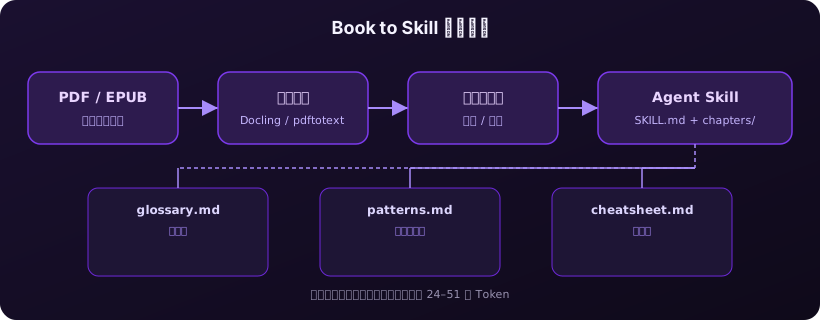
Book to Skill performs structured distillation instead of blind chunking:
- Extract title, author, chapter tree, and core mental models;
- Generate 800–1,200 token practitioner summaries per chapter (code and tables preserved for technical books);
- Build glossary, patterns reference, and decision cheatsheet;
- Keep
SKILL.mdas an index; load chapter files on demand.
Official benchmarks on real books show 24×–51× fewer tokens per question vs dumping the entire text. One-time conversion costs roughly $1 per book on Claude Sonnet—far less than re-uploading the PDF every session.
What is Book to Skill
book-to-skill is an open-source Python project (MIT) with two modes:
- Agent Skill mode (recommended): clone into
~/.cursor/skills-cursor/or~/.claude/skills/, run/book-to-skill ./my-book.pdfin chat; - CLI-only mode:
pip install book-to-skillinstalls the extractor without registering slash commands.
Inputs include PDF, EPUB, DOCX, TXT, Markdown, reStructuredText, AsciiDoc, HTML, RTF, and MOBI/AZW via Calibre. Point at a folder or glob to merge multiple sources into one skill.
Which approach should you pick
| Approach | Pros | Cons | Best for |
|---|---|---|---|
| Paste whole book | Zero setup | Token blow-up, no reuse | One-off Q&A |
| Vector RAG | Massive corpora, incremental updates | Weak book-level structure | Enterprise KB, support |
| Book to Skill | Author frameworks; on-demand chapters; Git-friendly | One-time conversion; poor on scans | Tech books, runbooks, specs |
If you keep returning to the same technical book and want Cursor to cite its decision rules while coding, Book to Skill is usually the best ROI. Already running How to Deploy GitHub MCP Server: A Cross-Platform Guide? Combine book principles with live repo state in one agent workflow.
Prepare your environment
git clone https://github.com/virgiliojr94/book-to-skill.git
cd book-to-skill
python3 scripts/extract.py --check
--check lists which extractors are installed and prints install commands for anything missing.
Pick the right PDF extractor
| Book type | Tool | Install | Notes |
|---|---|---|---|
| Prose-heavy | pdftotext (Poppler) | brew install poppler | Nearly instant |
| Technical (code, tables) | Docling | pip3 install docling | ~1.5 s/page, keeps Markdown tables |
Scanned PDFs without a text layer will fail—OCR first or use EPUB.
Install Book to Skill
Cursor users
git clone https://github.com/virgiliojr94/book-to-skill.git \
  ~/.cursor/skills-cursor/book-to-skill
Claude Code users
git clone https://github.com/virgiliojr94/book-to-skill.git \
  ~/.claude/skills/book-to-skill
GitHub Copilot CLI users
git clone https://github.com/virgiliojr94/book-to-skill.git \
  ~/.copilot/skills/book-to-skill
/skills reload
Full conversion workflow
Example: ~/Books/ddia.pdf (Designing Data-Intensive Applications).
Step 1: start conversion
/book-to-skill ~/Books/ddia.pdf designing-data-intensive-apps
Step 2: choose book type
Pick technical for code-heavy books (Docling). Pick text-heavy for prose.
Step 3: confirm cost estimate
Review token/cost preview (~$1/book) before generation starts.
Step 4: wait for the pipeline
Extract → merge → structure analysis → per-chapter summaries → glossary / patterns / cheatsheet → write skill directory. Run on a machine that will not sleep; long Docling runs on 300–500 page books can take minutes.
What you get after conversion
~/.cursor/skills-cursor/designing-data-intensive-apps/
├── SKILL.md
├── chapters/ch01-*.md …
├── glossary.md
├── patterns.md
└── cheatsheet.md
Chapter files are not loaded by default—the agent reads chapters/ch05-*.md only when your question needs it.
Daily usage
/designing-data-intensive-apps
/designing-data-intensive-apps replication
/designing-data-intensive-apps ch05
Typical prompt while coding: "I'm adding cache to the order service—walk me through consistency models per DDIA." The agent pulls the right chapter and cheatsheet.md, not generic advice.
With MCP tools (e.g. GitHub issues), combine book logic with live repo facts—same "book + ops" pattern as OpenShip Deployment Failure: 2026 Troubleshooting Guide.
Advanced patterns
Merge multiple documents
/book-to-skill ~/papers/*.pdf ~/notes/architecture.md team-knowledge
Analyze-only first
Preview frameworks and chapter tree before paying for full generation on large books.
Version control
Skill folders are Markdown—commit to .cursor/skills/ so the team shares the same knowledge base.
Troubleshooting
| Symptom | Likely cause | Fix |
|---|---|---|
| Zero chapters detected | No "Chapter N" headings | Use EPUB or manual sections (e.g. Pro Git) |
| Garbled code blocks | text-heavy on technical book | Re-run with Docling + technical |
/book-to-skill missing | Wrong skills path | ~/.cursor/skills-cursor/ + restart Cursor |
| Hallucination-like answers | Chapter not loaded | Name topic/chapter slug; check SKILL.md index |
| Conversion aborted | Sleep or API timeout | Always-on host; check /tmp/book_skill_work/ |
Summary
- Quick start: clone →
/book-to-skill your.pdf→ technical + Docling. - Long-term: Git the skill folder; fold-in new docs.
- Save tokens: on-demand chapters, not full PDF paste.
Book to Skill turns "I read it but forgot" into "the author's framework is one prompt away while I code." For batch conversions or parallel agent work, use an always-on cloud Mac so sleep does not kill a 40-minute pipeline.
FAQ
How is Book to Skill different from vector RAG?
RAG retrieves similar snippets. Book to Skill distills structure—frameworks, anti-patterns, chapter index—then loads whole chapter summaries on topic.
Do I need Claude?
Conversion uses Claude inside the agent session. Output is standard Markdown—any Cursor model can use the skill afterward.
Will scanned PDFs work?
Not reliably. OCR first or use publisher EPUB.
What does one book cost?
About $1/book (Claude Sonnet). One-time; queries only load needed chapters.
Run long conversions on an always-on cloud Mac
Docling extraction plus multi-pass API generation on 300+ page PDFs can run 30+ minutes. A Mac mini M4 cloud node stays awake and lets you git push the finished skill folder to your team.