Last updated August 6, 2026. Deployment parameters and model tags verified against the Ollama model library, llama.cpp documentation, and the DeepSeek website.
You might be an iOS or Flutter developer whose daily driver is a Windows gaming laptop or a budget desktop with an RTX 3050. After DeepSeek went mainstream, the question everyone asks is simple: "Can I run it locally on this GPU?"
The honest answer is not a flat yes or no. It depends on which model tier, which quantization, how much context you need, and when to stop fighting VRAM and switch to an API or a cloud Mac. This guide follows that decision chain: first the ceiling of 8GB (or 4GB laptop) VRAM, then copy-paste deployment commands, then a comparison with Apple Silicon unified memory and Kvmkit cloud Mac as an alternative path.
If you have already tried pulling a model and watched nvidia-smi spike before a crash, you are not alone. Most failures on a 3050 are sizing mistakes—wrong quant tier, context left at default 8192, or downloading a full-precision checkpoint meant for 24GB cards. The sections below are ordered so you can stop as soon as your use case is covered.
Introduction: the 3050 user's dilemma
In 2026 the RTX 3050 is still many developers' first discrete GPU: desktop cards often ship with 8GB GDDR6, while laptop variants commonly have 4GB capped at 35–60W. That is fine for casual gaming, but LLM inference cares about VRAM capacity and memory bandwidth, not frame rates.
DeepSeek's marketing highlights V3 and R1 at full scale—that world belongs to data-center GPUs or paid APIs. What a local 3050 can actually run are official distilled small models (Qwen-based 7B and 1.5B distillations) and community GGUF quant packs. Align expectations with "private code assistant / local Q&A / agent prototype," not "replicate the full web DeepSeek experience," and your deployment success rate goes up sharply.
That distinction matters for compliance conversations too. A distilled 7B running on your LAN keeps prompts on your hardware; it does not magically give you V3-grade reasoning. Teams that need audit trails for model version and data residency often pair a small local model for drafts with an API call for final review—same split many iOS shops already use between on-device Core ML and cloud enrichment.
Core concepts: VRAM, quantization, and GGUF
At inference time VRAM is consumed by four buckets: model weights, KV cache (context), activation scratch space, and framework overhead. After the driver and desktop reserve their share, an 8GB 3050 often has only 6.5–7GB left for the model.
Choosing a quantization tier
Common GGUF tiers and rough weight-only footprint for a 7B model (context not included):
- Q8_0: best quality, ~7.5GB+ for 7B—usually no room for meaningful context on 8GB;
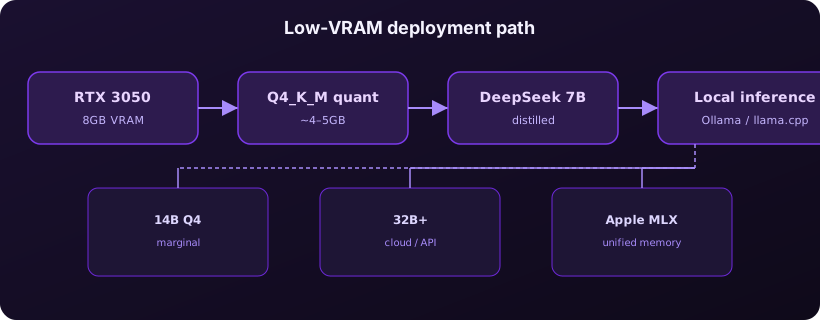
- Q4_K_M: balanced quality and size, ~4.5–5GB for 7B—the default pick for 3050 8GB;
- Q3_K_M / Q2_K: smaller but noticeably worse reasoning and code quality—fine for experiments only.
Every extra 1K tokens of context adds linear KV cache pressure. 8K context on 7B Q4 is often still workable; if you need 32K for long-document summarization, an 8GB card must shrink batch size or offload layers to system RAM, which slows generation to a crawl you will feel in daily use.
A practical rule: estimate context as roughly 15–25% of total VRAM on top of weights for interactive chat. Batch size 1 with streaming is what most IDE integrations use; raising batch without headroom is a common hidden OOM trigger when multiple clients hit the same local server.
Which DeepSeek models work—and which do not
Match names before you download multi-gigabyte weights by mistake:
- Works on desktop 3050 8GB:
deepseek-r1:7b,deepseek-r1:1.5b, Hugging FaceDeepSeek-R1-Distill-Qwen-7BGGUF at Q4; - Marginal (aggressive quant + short context): 14B at Q3/Q4 tiny tiers—generation may fall below 5 tokens/s with limited practical value;
- Not local on 3050: DeepSeek-V3, full R1 671B MoE, and similar—use the DeepSeek API or a hosted router.
If your goal is Swift or Dart completion on single files, 7B distill + Q4 is usually enough. For cross-repo agent tool calling, a small local model hallucinates more often; a layered setup—cloud model for planning plus local model for privacy-sensitive snippets—pairs well with the stop-loss patterns in our Kimi K3 Tool Calls loop guide.
Hands-on: Ollama and llama.cpp deployment
Option A: Ollama (recommended for getting started)
Install Ollama on Windows or Linux, then run:
# Pull DeepSeek R1 distilled 7B (official Ollama tag)
ollama pull deepseek-r1:7b

# Interactive session
ollama run deepseek-r1:7b

# Check VRAM usage (separate terminal)
ollama ps
Ollama tries to use the GPU by default. If you hit OOM, create a Modelfile to cap context:
FROM deepseek-r1:7b
PARAMETER num_ctx 4096
PARAMETER num_gpu 99
Then ollama create ds7b-4k -f Modelfile and run the custom tag. Ollama also exposes an OpenAI-compatible HTTP API—point Cursor or your agent framework at http://localhost:11434.
On Windows, confirm the Ollama tray icon shows GPU acceleration after the first pull. If inference falls back to CPU, check that no other app holds the GPU in exclusive full-screen mode and that WSL2 is not competing for the same card when you run Docker Desktop side by side.
Option B: llama.cpp (fine-grained control)
Download DeepSeek-R1-Distill-Qwen-7B-Q4_K_M.gguf from Hugging Face and launch CUDA-enabled llama-server:
llama-server -m DeepSeek-R1-Distill-Qwen-7B-Q4_K_M.gguf ^
  -ngl 99 -c 4096 --host 0.0.0.0 --port 8080
-ngl 99 offloads as many layers as possible to the GPU. If OOM persists, drop -ngl to 20–30 and let remaining layers run on CPU. On Windows, CPU offload noticeably increases time-to-first-token but at least keeps the model alive.
Acceptance checklist
nvidia-smishows Python or ollama VRAM stable under 7GB;- Ask the same prompt three times in one session—watch for context buildup OOM on the third turn;
- Feed a 200-line Swift file an "explain this function" task; log first-token latency and total time.
Performance tuning and common errors
Driver and runtime hygiene
Before chasing exotic flags, confirm baseline health: NVIDIA driver matched to your CUDA build, no pending Windows Update reboot, and enough free disk for model cache (7B Q4 needs several GB on SSD). Thermal throttling on laptops shows up as stable VRAM but collapsing token rate after two minutes—use a cooling pad or cap power limits knowingly.
Logging helps: record prompt tokens, completion tokens, and wall time per request. When the third turn in a session OOMs but the first succeeded, you are looking at KV cache growth, not bad weights—fix context or enable session reset between tasks.
| Symptom | Likely cause | Fix |
|---|---|---|
| CUDA out of memory | Model too large or context too long | Switch to Q4_K_M or smaller model; set num_ctx to 2048–4096 |
| Speed < 3 tokens/s | Too few GPU layers or laptop throttling | Raise -ngl; plug in and enable high-performance power mode |
| Gibberish or repetition | Quant too aggressive or temperature too high | Move up to Q4_K_M; temperature 0.3–0.7 |
| GPU not detected | Stale driver or CUDA runtime | Update NVIDIA drivers; reinstall CUDA-enabled Ollama build |
If a 4GB laptop 3050 cannot fit 7B Q4 at all, start with deepseek-r1:1.5b or move inference to a desktop with more RAM or a cloud node. For knowledge-base workloads, structured retrieval plus a small model often beats stuffing long context—see our PDF to AI knowledge base guide for that pattern.
Cloud Mac and Apple Silicon scenarios
Many iOS teams still need macOS for signing and Xcode builds even when day-to-day coding happens on Windows. Apple Silicon's edge is unified memory: a 24GB Mac mini can dedicate 10–14GB to a model without fighting an 8GB VRAM wall.
On Mac, distilled DeepSeek models commonly run through MLX or Ollama for macOS. MLX is better optimized for Apple GPU; the same 7B model on M4 is often quieter and more power-efficient than a 3050 under load. If your only local machine is Windows + 3050 but you need long agent sessions, Xcode side-by-side, or 14B+ experiments, renting a cloud Mac mini hourly can beat buying another GPU—you skip driver drama and release the instance when the sprint ends.
Kvmkit cloud Mac fits three patterns: (1) Windows primary machine plus occasional macOS builds; (2) 7B on 3050 is enough locally but larger MLX trials need 24GB+ unified memory; (3) CI or overnight batch jobs that should not monopolize your home GPU.
Remote desktop latency is usually acceptable for editing and terminal work; what you gain is a macOS file system, Keychain, and Xcode without dual-booting. Upload model weights once to the cloud volume, run MLX benchmarks there, and keep your 3050 box free for Windows-native game or CUDA experiments.
Cost, performance, and risk comparison
Pick a path based on how often you run inference and whether macOS is in scope—not on benchmark bragging rights alone.
Rough comparison for individual developers experimenting—not a full TCO model with power and depreciation:
| Approach | Up-front cost | Typical models | Main risks |
|---|---|---|---|
| Existing RTX 3050 8GB | $0 (already owned) | 7B Q4 distill | VRAM ceiling, laptop throttling, fan noise |
| GPU upgrade (12GB+) | $200–600+ | 14B Q4, longer context | PSU/case fit, still no native macOS |
| DeepSeek API | Pay per token | Full V3 / R1 | Data residency, quotas, network latency |
| Cloud Mac mini (Kvmkit) | Hourly or monthly | MLX 7B–14B, Xcode on same host | Session planning, data transfer |
If you touch local models a few hours a week, 3050 + Ollama is plenty. If you run agents more than four hours daily and still need iOS builds, cloud Mac often wins on total time cost—you are buying macOS, large memory, and always-on availability together, not just raw tensor throughput.
Hybrid setups are common in 2026: keep sensitive snippets on the 3050 box, route planning and tool orchestration to a cloud model with stronger reasoning, and use a rented Mac mini only for the weeks you ship an iOS build. That avoids paying for three stacks when one week of cloud time covers the release window.
FAQ
Can an RTX 3050 run full DeepSeek-V3 locally?
No. Full V3 weights and activation memory far exceed 8GB. Use distilled 7B/1.5B locally or the official DeepSeek API for full capability.
How do laptop and desktop RTX 3050 cards differ?
Laptop cards often have 4GB VRAM—stick to 1.5B or very conservative 7B settings. Desktop 8GB cards can run 7B Q4_K_M steadily. Both may throttle under sustained loads.
Should I use Ollama or llama.cpp?
Ollama for fast validation; llama.cpp when you need custom GGUF, layer offloading, or embedded deployment. They share the same model ecosystem—prototype in Ollama, then export requirements.
What if VRAM is still not enough after quantization?
Shorten context, offload layers to CPU, pick a smaller model, use a cloud API, or run MLX on a cloud Mac with larger unified memory.
Summary
- RTX 3050 8GB can run DeepSeek distilled 7B at Q4—good for local code Q&A and prototypes, not full V3.
- Quantization and context length are the main tuning levers; on OOM, lower
num_ctxbefore dropping quant tier or model size. - When you need macOS, more memory, or long-running agents, a cloud Mac mini is often more flexible than forcing a GPU upgrade.
Squeezing a 3050 is not embarrassing—the trick is knowing the ceiling and routing "must be full-scale" work to APIs or the cloud. If your next step is running Xcode and MLX inference in parallel on Apple Silicon, migrate experiments to an always-on cloud node so closing your laptop does not kill the job.
Start with deepseek-r1:7b at Q4, validate one real task from your repo, then decide whether any bottleneck is GPU, context, or macOS access—that single test saves more time than swapping models at random.
Document the quant tier and num_ctx you settle on so teammates reproduce the same setup on their own 3050 boxes.
When VRAM runs out, unified-memory cloud Mac is simpler
A 3050 running 7B distill is a solid entry point. Once you need 14B+ models, MLX-optimized inference, or agent pipelines beside Xcode, Apple Silicon unified memory and macOS tooling are the smoother path. Kvmkit cloud Mac mini M4 gives you an always-on, low-power remote workspace: keep coding on Windows locally and offload heavy runs to the cloud—no interim GPU purchase or Hackintosh detour.
View Kvmkit cloud Mac plans and run DeepSeek experiments alongside iOS builds in one stable environment.