Last verified on 11 September 2026 against the DeepSeek Harness repository, the Skills subsystem reference, and the Process Sandbox docs.
Swapping DeepSeek for Claude or Gemini can make the chat nicer. It does not stop the same production failure: the model calls tools, edits files, and runs scripts, and nobody can say why that step happened, whether it can be replayed, where it wrote, or whether a retry is safe. In 2026 the Agent bottleneck is no longer “who answers more fluently”. It is who can finish a task without leaving a mess.
Up front: the model decides the next intent. The Harness owns the loop, the session, and plugin composition. A Skill loads a reusable playbook on demand instead of stuffing every procedure into the system prompt. The Sandbox limits which files that one subprocess may touch, and it fails closed if confinement cannot be enforced. Drop any layer and a demo still works; an audit does not.
If you already run models on thin GPUs, the same lesson shows up in hardware form. Our note on running DeepSeek on an RTX 3050 is about VRAM; this piece is about the control plane around whatever model you picked.
Three failures a bigger model will not fix
Treating “a stronger model” as an Agent plan usually breaks in three places at once. Changing vendors does not repair them.
The first is a loop with no memory you can trust. A real task lists a directory, reads a file, patches code, and runs tests. If that history lives in a process-local array, a restart or a UI refresh wipes the model’s working memory. Worse, the person debugging cannot read the same event log. They guess from screenshots.
The second is playbook overload. Teams paste release rules, style guides, and ticket workflows into the system prompt. The window fills up, steps get skipped, and another “you must follow this” paragraph only makes the prompt louder. The model should see a catalog most of the time, and load one body when it actually starts the work.
The third is unconfined side effects. A shell tool can write outside the repo, touch a secrets file, or leave a half-finished patch on disk. A prompt that says “do not do that” is not a control plane.
A larger context window does not fix this. It only lets a bad playbook occupy more tokens. The loop and the file boundary still belong to an execution layer. If you have already fought tool-call loops on another stack, keep the same discipline; only the field names change. See our Gemini Agent function-calling guide for the same split between intent and execution.
What the Harness actually owns
DeepSeek Harness (dsh) calls itself an open-source agent harness, not another chat skin. The public line is “everything is a plugin”: model adapters, system prompts, tool registration, session logs, the Agent interface, and the default loop ship as replaceable packages, composed with Cordis. The repo is still a developer preview. Breaking changes can land. That does not stop you from using it to see what an execution layer must own.
In practice the Harness carries three jobs the model cannot.
- Who drives the next step. The default
agent-loopis one implementation of theAgentcontract. Plugins should depend on that interface, not weld business rules to the default driver. Open loops fit fuzzy goals. Approval-heavy work belongs in an outer deterministic workflow. - A session you can rebuild. The next model request should be derivable from the Session Log, not from a temporary array in one function. Raw chunk events stay so you can replay, render, and debug.
- Composition you can patch. Profiles, Bundles, and Patches stack into a runtime plugin tree. Swap a model provider, sandbox backend, or UI with a Patch before you fork core packages.
dsh --profile web --dump-configprints the tree the machine actually boots.
So the Harness is not “make the model smarter”. It answers who runs the next step, where history lives, and which seam you are allowed to replace. Without it, Skills have no stable injection point and the Sandbox has no stable caller.
What a Skill is for
Officially a Skill is an optional instruction, not a session event. The model normally sees a catalog: sorted name values and escaped, truncated description text (default cap 500 characters). Bodies, paths, sources, and routing hints stay out of the prompt. When the work starts, the model calls skill({ name }). The framework resolves the winning skill against the session cwd and returns a canonical payload.
Local skills use kebab-case names. You can ship a directory bundle with SKILL.md or a flat Markdown file. Nested recursive **/SKILL.md discovery is not supported. The local provider scans roots in rank order: project .dsh/skills first, then .agents/skills, then custom dirs, user dirs, and bundled skills. The project root is the nearest Git root; without one, the cwd itself is the root.
That layer answers “when does the playbook appear”. Put a release checklist or a test-patch procedure in a Skill so the model loads it only for that job. Editing the body changes later calls; it does not rewrite older tool results. Catalog changes can hot-refresh, but an incomplete discovery must not clobber the last good catalog.
A Skill is not a permission system. It tells the model how to work. It does not decide whether a write may leave the workspace. Without a Sandbox, a very clear “deploy this” Skill is more dangerous, because the dangerous steps become easier to execute.
What the Sandbox confines
The Process Sandbox covers file effects of a same-host subprocess. Network and process visibility are outside that vocabulary. Containers, microVMs, and remote runners are sibling capability seams, not providers of ctx.sandbox. The local provider uses bwrap/Landlock on Linux, Seatbelt on macOS, and a restricted token plus ACLs on Windows.
There are three modes. Only the first two go to the isolating provider:
read-onlydenies writes; POSIX runners still allow the/dev/nullsink shells need.workspace-writeallows writes under the session’s immutable cwd and a backend temp area.danger-full-accessskips confinement. The caller spawns the original argv and never callsctx.sandbox.
The rule that matters in a lab is fail closed: if you asked for confinement and no backend can enforce it, throw SANDBOX_UNAVAILABLE. Silent unconfined passthrough is illegal. Policy is resolved per call, so bash can be read-only while a child agent writes its state directory. Consumers must also split two failures: the runner never started, versus confinement working and blocking a write. The first is infrastructure. The second means the Sandbox did its job.
Enforcement may report full or partial. Older Landlock ABIs and some Windows ACL edges are partial today. If you need an absolute promise, do not treat partial as locked down.
How one task uses all three
Walk a “fix the failing test and open a patch” job and the split stops being abstract.
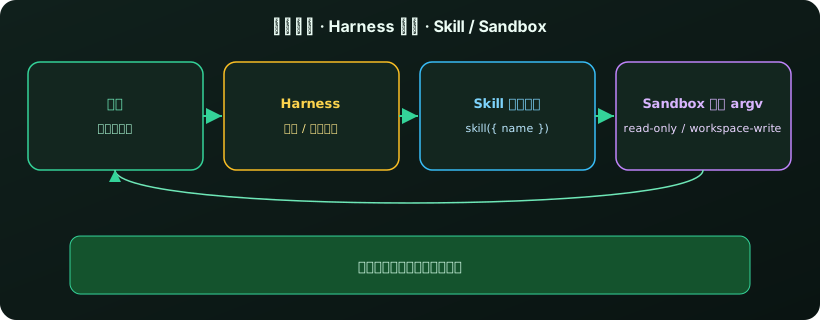
- The Harness rebuilds context from the Session Log and injects the visible skill catalog (names and descriptions only).
- The model loads something like
repo-test-patchinstead of inventing steps from memory. - The
skilltool rereads the body for this cwd and returns instructions plus relative resource hints. - The model asks to read files or run tests. The Harness runs the tool pipeline. The Sandbox wraps that argv under this call’s policy.
- Results go back into the Session Log. The next step is derived from the log, not from a global “we probably did that” variable.
Without the Harness you have no stable catalog injection or result persistence. Without Skills the system prompt drowns in manuals. Without the Sandbox, a clearer Skill is just a clearer privilege-escalation guide. The three layers complement each other; they are not three names for one feature.
How to run it and write a first Skill
The fastest official start is npx @deepseek-ai/dsh web, which opens the Web UI at http://127.0.0.1:3080 by default. From source: clone, then pnpm install && pnpm run build && pnpm dsh web. On an SSH launch it usually prints the host URL and leaves the forwarded local address to your client.
Put the first project skill under the repo root, where the local provider looks first:
---
name: repo-test-patch
description: Use only when a failing test must be fixed with a minimal patch.
---

# repo-test-patch
1. Confirm the branch at the workspace root.
2. Run the failing test before editing production code.
3. Limit the patch to files that the failure actually touches.
4. Do not write outside the workspace.
Names must be kebab-case. Use a SKILL.md bundle; deep nesting will not be discovered. Frontmatter keys disable-model-invocation and user-invocable decide whether the model or a human sees the entry. Turn both off and only a trusted ctx.skills.get() caller can still load it.
After boot, check three facts: a skill-catalog message appeared in the session; a skill call returns the body instead of pasting the whole manual into the system prompt; a write outside the workspace under read-only is denied by the backend, not merely discouraged by the prompt. If no isolating backend exists, the process should error out rather than keep running bare.
Treat DeepSeek Harness as an architecture sample you can verify, not as a platform that has already passed production certification. You are accepting the loop, the catalog, and the confine path — not a marketing clip.
When the full stack is worth it
| Your situation | Do this | Why |
|---|---|---|
| One structured lookup or a single function call | Skip a full Harness | A function-calling loop is enough |
| Repeated repo edits, tests, and replay | Harness + Session Log | Without a rebuildable log, debug is screenshots |
| The same procedure across many repos | Ship a Skill | On-demand load beats a bloated system prompt |
| The model can run a shell or write files | Sandbox, fail-closed | A prompt is not a file-effect policy |
| Fixed approvals and compensating actions | Deterministic outer workflow | The open loop should only reason locally |
Against a homemade while loop plus a few tools, DeepSeek Harness buys separated seams for composition, session rebuild, and per-call confinement. You pay for the Cordis model, preview-stage breakage, and the team learning that Skill and Sandbox are not the same thing. That split is worth it if you will actually swap model backends, sandbox implementations, or share a skill catalog across repositories this year.
Bottom line: a stable Agent in 2026 is not another chat model. Split judgment, the loop, the playbook, and the file boundary. The Harness finishes the run. The Skill explains the job when needed. The Sandbox says where this call may write. Together they turn a demo into a task you can audit.
FAQ
How is a Harness different from a model API?
A model API emits the next intent or tool call. A Harness drives the loop, persists the session, composes plugins, and decides when to inject a skill catalog or hand a tool call to confinement.
Does a Skill grant write access?
No. A Skill is an on-demand playbook. The catalog usually exposes only a name and description. Whether a write is allowed is decided by this call’s Sandbox policy.
Does the Sandbox block network calls?
The official Process Sandbox vocabulary covers file effects only. Network and process visibility are out of scope. If you need network isolation, add another capability seam. Do not expect read-only to block egress.
Can we run this as production infrastructure today?
Use it as an architecture sample and a prototype host. Do not treat it as production-certified. The official repo is still a developer preview and may break compatibility.
Isolate Agent experiments on a cloud Mac mini
On macOS the DeepSeek Harness sandbox uses Seatbelt, and Skills resolve against the project cwd. Running a preview Agent on your only production build Mac stacks the loop, the playbooks, and file isolation on customer work. An M4 Mac mini’s unified memory is enough to keep a stable build lane and a disposable dsh box side by side. Idle power around 4W makes a 24/7 “Agent-only, never the release branch” node realistic. Native Unix, Homebrew, and SSH let you pin the workspace root more predictably than remoting into a home Windows laptop.
If you want the Harness prototype off the machine that ships builds, Kvmkit cloud Mac mini M4 can add an isolated node on demand—see current plans so skill catalogs and sandbox modes have somewhere to fail safely.