Last checked on 18 September 2026 against the DeepSeek Harness repository, the Plugin Config Catalog, the pack-and-install guide, and the DeepSeek API pricing page.
The config catalog lists dozens of @deepseek-ai/dsh-* packages. The usual first move is to enable everything so the Agent “codes better”. The usual result is the opposite: tool names crowd the window, MCP processes run unsandboxed, the session log bloats, the invoice arrives first, and the patch quality does not follow.
Up front: DeepSeek Harness (dsh) says Everything is a Plugin. For writing code you are not buying a plugin count. You are buying six jobs: read the repo, edit files, run tests, load a playbook on demand, replay the session, meter the tokens. The ten packages below cover those jobs. Most of the rest is UI, a demo, or a swappable backend. Add them when the scene actually needs them.
In August we mapped seams in the Agent Framework architecture note. In September we ran Harness, Skill, and Sandbox hands-on. Those pieces answer why the execution layer is split. This one answers a smaller question: you already chose dsh for coding — which packages go in the profile, how they stack, and what a month roughly costs.
Do not install the catalog: plugins are a composition
Officially, the model adapter, tool registry, session log, and agent loop are replaceable packages stacked into a Profile by Cordis. The install door is dsh plugin --profile web add <package>. It forwards to pnpm in the profile directory and only promotes packages that declare dsh.bundle. Later bundles, the profile’s own cordis.patch.yml, home-level patches, and --patch overlays win in that order.
For people who write code, that means three things.
- Loaded is not the same as exposed to the model. The MCP client registers outside tools as
mcp__server__tool. The docs are blunt: each MCP server is trusted executable code outside the sandbox, and none is on by default. - Layer order decides who wins. To swap a model, swap a sandbox, or hide a tool, write a Patch. Do not copy a core package.
dsh --profile web --dump-configshows the tree the machine actually boots, which is more honest than the catalog table of contents. - The repo is still a developer preview. Breaking changes can happen. Use it as a swappable execution layer. Do not treat it as a certified production platform.
So these ten packages are not “the official full list”. They are the smallest set that shows up in AI coding. If a tool loop has already run away on another model, the field names change and the failure does not. See our Kimi K3 tool-call stop guide: halt the loop first, then talk about plugins.
Ten plugins that actually help AI coding
Each package below is named for the failure it absorbs. Pairs are one capability seam — definition, provider, or consumer. Install the pair, not half of it.
1. dsh-tool-fs + dsh-tool-fs-search: see the repo first
A model that has not listed the tree will still “refactor”. Read and search are the precondition for every later edit. Without this pair, the surgical editor confidently patches the wrong path.
2. dsh-tool-str-replace-editor: patch hunks, do not rewrite files
The expensive failure is not a missed edit. It is one call that rewrites a whole file from the model’s stale memory. A string-replace editor forces an old span and a new span, and it fails on conflict instead of silently overwriting. On a multi-file change it is cheaper than “emit the full file”, and easier to roll back.
3. dsh-tool-bash + dsh-bash-sandbox: tests must run, and must stay caged
Red tests, linters, and build logs eventually need a shell. Official Process Sandbox only covers file side effects of a same-machine subprocess: read-only refuses writes, workspace-write allows the session workspace, danger-full-access skips confinement. If isolation was requested and no backend is there, the call must raise SANDBOX_UNAVAILABLE. Network isolation is a different seam. Do not expect read-only to block outbound traffic.
4. dsh-tool-lsp + dsh-lsp-stdio: put the compiler in the loop
The model “feeling” that types are fine is not a language-server diagnostic. stdio LSP turns go-to-definition, diagnostics, and symbol queries into tools. Worth it on TypeScript, Go, or Rust. Skip it on a script dump or a docs-only task so you do not spend a round on extra tool names.
5. dsh-tool-skill + dsh-skill-filesystem: playbooks appear on demand
Put style rules, a release checklist, and the test entrypoint in a Skill. The model sees a catalog most of the time and calls skill({ name }) when it starts the work. Project .dsh/skills beats .agents/skills. A Skill is not a permission system: a clearer playbook is more dangerous without a sandbox. The previous hands-on piece covers the mechanics. Here the point is simpler — this pair replaces the pile of “you must” lines in the system prompt.
6. dsh-mcp-client: bring GitHub-class tools in
One plugin instance is one MCP server. stdio can launch @modelcontextprotocol/server-github; the model then sees names like mcp__github__create_issue. Use it to read a PR, list issues, or inspect checks. Do not make it a daily default. Secrets stay in environment variables. The process sits outside the sandbox, so each extra server is another trust surface.
7. dsh-plan-mode: write the plan before the workspace moves
Cross-file refactors, public API changes, and migration scripts go badly when the model thinks and writes in the same breath. Plan mode turns “list the steps and wait” into plugin behavior, not a polite prompt. Skip it for a one-test fix. Turn it on once three directories are in play.
8. dsh-tool-todo: pin a multi-step job to the session
A task like “fix the flake, add a regression, update the README” leaks the last step if it lives only in chat memory. Todo makes the list a mutable session object. It does not replace a Skill (how) or a Plan (whether, and in what order).
9. dsh-compaction-tool-result-pruner + dsh-token-meter: prune results before you swap models
Coding bills rarely die on turn one. They die on turn ten, when the full test log, the full diff, and a fetched page are still in context. The pruner drops tool output that is no longer cited. The meter shows what each turn cost. Without a meter you cannot tell whether the model is expensive or the plugins stuffed the window.
10. dsh-session-persistence-sqlite: a session you can replay, not a RAM ghost
After a restart, a tab change, or a handoff, the next turn has to rebuild from disk. JSONL can record events. SQLite is easier when you later ask “why did it change that line”. Without this layer, the other nine plugins leave you with screenshots.
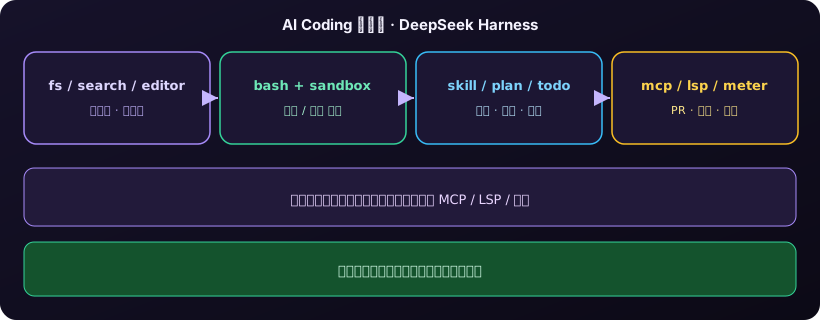
Four coding scenes, different plugin sets
The same ten packages should not all be on for every task. Pick by the job, not by what looks professional.
Scene A: a red test. Minimum set: fs/search, str-replace, bash+sandbox. Read the failure, change the smallest span, rerun the same test. Load a Skill only if the repo has a fixed “run this command first”. Plan and MCP are noise here.
Scene B: a cross-file refactor. Add plan-mode, todo, and LSP on top of A. Make the model name the symbols and the tests that must stay green, then allow writes. Open replace without a plan and you get a half-renamed public function with stale callers.
Scene C: a GitHub review or a PR patch. Add one MCP client, one server. Use it for the diff, checks, and comments. File edits still go through the editor and the sandbox. Do not put “open an issue, merge, delete the branch” on the same default tool list as daily edits.
Scene D: a long, exploratory session. Add compaction, the token meter, and SQLite persistence. After twenty files, unpruned tool results make every later turn pay for stale logs. A stronger model will not shrink that window.
Three stacks: daily, team, cost control
Fold the scenes into three copyable Profiles. That is less likely to drift than editing cordis.yml per task.
| Stack | On by default | Leave off | Who it is for |
|---|---|---|---|
| Daily coding | fs/search, editor, bash+sandbox, skill | MCP, sub-agents, full web search | One person fixing bugs and small features |
| Team | Daily + plan + todo + SQLite + one GitHub MCP | A second MCP, danger-full-access | Replay and PR-facing work |
| Cost control | Daily + token-meter + result pruner + Flash | Pro as the default, untrimmed logs | Tens of loops a day |
Web search and sub-agents are allowed — they are just expensive and wide by default. The catalog has dsh-web-search-deepseek, dsh-tool-web, and several subagent implementations. Open them with a Patch when you need docs or a read-only research fork. Do not bake them into the daily bundle.
Remember the layer order: @deepseek-ai/dsh-base first, then dsh plugin --profile <name> add, then the profile patch to hide tools you do not want exposed. Git-hosted source plugins with a prepare script get blocked by pnpm 10 until you allow the build. Follow the official hint. Do not unlock global danger just to finish an install.
What you pay: tokens, the box, plugin tax
The plugins themselves have almost no license fee. You pay for model tokens, a machine that stays up, and every external process that escapes the sandbox.
Tokens are the large line. The official September 2026 card, per million tokens: deepseek-flash (V4.1-Flash) cache hit about $0.003 / $0.006, cache miss $0.15 / $0.30, output $0.60 / $1.20 (off-peak / peak). deepseek-v4-pro miss $0.66 / $1.32, output $1.98 / $3.96. Peak is Monday–Friday UTC 01:00–04:00 and 06:00–10:00 — two working-day windows in Beijing time — and off-peak is half. One pass that reads eight files, keeps two test logs, and writes a small patch can burn tens of thousands of input tokens. Leave them unpruned and turn ten pays for turns one through nine again.
A rough daily number: 30 loops, 20k input (miss) + 1k output each, Flash off-peak is about $0.11 a day, about $3 a month. The same count on Pro, with full test output left in the window, can land in the tens of dollars. Save money in this order: prune tool results and hit the cache, then decide whether a single task needs Pro. Do not start by swapping the model.
The machine is the second line. npx @deepseek-ai/dsh web binds 127.0.0.1:3080 by default. That is fine for a laptop you shut at night. If the SQLite session, the Skill tree, and the sandbox policy need to stay reachable, you need a box that does not sleep. A lid-close and a home NAT change will hide the same session from a remote teammate. A cloud Mac mini is not “smarter than the API”. It is a place to keep preview Harness off the machine that ships builds. Seatbelt, a Unix toolchain, and a pinned cwd are more predictable than remoting into a laptop that naps.
Plugin tax is the third line. Each extra MCP server is another out-of-sandbox process and another secret. LSP keeps a language server warm. A web fetch pours HTML into context. None of that is on the DeepSeek card, but it eats Flash’s price advantage. The daily four-pack is almost free. A team stack plus one GitHub MCP is usually still worth it. Default-on search, sub-agents, and a second MCP leak cost from tokens into ops.
The repo is still a preview. Welding Harness onto the only customer build box stacks the loop, the playbook, and outside processes onto the release path. An isolated node can be dropped, rolled back, and limited. That is the deployment cost worth buying.
When to add a plugin, and when not to
| Your case | Do this | Why |
|---|---|---|
| One function and one test | Daily four-pack | Plan, MCP, and LSP are extra tool names |
| A public API or three-plus directories | Add plan, todo, LSP | Agree the steps before writes |
| PR comments or checks | One GitHub MCP only | Outside tools are a trust surface |
| Tens of loops a day, a jumping bill | Meter + prune + Flash | See what filled the window before you swap models |
| Skill and Sandbox still feel like one thing | Do not grow the plugin list | A fuller playbook makes bare writes worse |
Against a home-grown “while loop plus two tools”, dsh buys you layering, session rebuild, and per-call isolation. You pay for preview breakage and for the discipline not to tick every catalog row. That trade is worth it if you will actually swap a model backend, swap a sandbox, or reuse the same Skills across repos. If you only want to see whether a model can chat, skip the full stack.
Last line: in 2026, the team that wins at DeepSeek Harness coding is not the one that installed the most packages. It is the one that can say which layers this task needs. Read, edit, run, load a playbook on demand; keep the session replayable and the tokens visible. Plugins compose. They are not a collection.
FAQ
Do I have to install all ten at once?
No. Start with fs/search, the editor, bash+sandbox, and skill. Add plan, LSP, MCP, pruning, and SQLite when the scene needs them. Most other catalog rows are swappable backends or UI, not a coding requirement.
Is the MCP plugin safe?
Officially each MCP server is trusted executable code outside the sandbox, and none is enabled by default. Open only the one you need, keep secrets in the environment, and do not mix it into the same default list as daily editors.
Why not default to Pro for coding?
Coding cost comes from multi-turn tool results, not from “the model is not smart enough”. Official Flash off-peak output is about $0.60 per million tokens; Pro is about $1.98. Prune logs and hit cache first, then decide whether one task needs Pro.
Can we treat this as a production coding platform today?
Use it as an execution-layer sample and an isolated experiment. Do not treat it as production-certified. The official repo is still a developer preview. Keeping preview Harness off the shipping box is more useful than arguing about “production”.
Run a disposable dsh node on a cloud Mac mini
An AI coding plugin stack wants a pinned cwd, a SQLite session that stays up, and Seatbelt on macOS. Putting preview dsh and a GitHub MCP on the only ship box stacks the loop, the playbook, and outside processes onto customer work. An M4 Mac mini’s unified memory can hold a stable build and a limited, rollback-friendly Harness at the same time. Idle draw is about 4W. Native Unix and SSH keep the Skill tree and the sandbox workspace on a machine that does not sleep.
If you want the daily coding node off the release builder, Kvmkit cloud Mac mini M4 can add an isolated box on demand — see the plans and give plugin composition a place to fail without blocking a ship.